
mercoledì 26 dicembre 2012
01000010 01110101 01101111 01101110 00100000 01101110 01100001 01110100 01100001 01101100 01100101 00100000 01100101 00100000 01100010 01110101 01101111 01101110 00100000 00110010 00110000 00110001 00110011 00100000 00100001 00001010 01101000 01100001 01110000 01110000 01111001 00100000 01101110 01100101 01110111 00100000 01111001 01100101 01100001 01110010 00100000 01100001 01101110 01100100 00100000 01101101 01100101 01110010 01110010 01111001 00100000 01111000 01101101 01100001 01110011 00100000 00100001
01000010 01110101 01101111 01101110 00100000 01101110 01100001 01110100 01100001 01101100 01100101 00100000 01100101 00100000 01100010 01110101 01101111 01101110 00100000 00110010 00110000 00110001 00110011 00100000 00100001 00001010 01101000 01100001 01110000 01110000 01111001 00100000 01101110 01100101 01110111 00100000 01111001 01100101 01100001 01110010 00100000 01100001 01101110 01100100 00100000 01101101 01100101 01110010 01110010 01111001 00100000 01111000 01101101 01100001 01110011 00100000 00100001


domenica 28 ottobre 2012
Sniff Wireless Network in 5 minutes from Linux Ubuntu !
Have a nice Linux Day !
In the previous post, I wrote how to sniff from a Wireless Network covered by WPA password Protection.
If the Wireless network is open without any password protection we can sniff directly in Realtime.
To do this we need to create a fake interface that receive all packets as the router.
To see all data packets Wireshark (analize network protocol) should be in Promiscue mode.
Below the steps :
1. switch the wlan0 card off
fafa@fafa-K52Jr:~$ sudo ifconfig wlan0 down
2. Put the wireless card in monitoring mode
fafa@fafa-K52Jr:~$ sudo iwconfig wlan0 mode monitoring
3. Switch the wlan0 card on
fafa@fafa-K52Jr:~$ sudo ifconfig wlan0 up
4. looking for the target (router wireless)
fafa@fafa-K52Jr:~$ sudo aireplay-ng -9 wlan0
It's possible all MAC address regarding the Wireless net near my computer.
The target is 'malaki'
5. set up the wireless channel
iwconfig wlan0 channel 6
6.sudo airtun-ng -a 04:18:0F:37:5D:53 wlan0
created tap interface at0
No encryption specified. Sending and receiving frames through wlan0.
7. Open another Shell
Active the fake interface created in the previous step
sudo ifconfig at0 up
8.Open Wireshark and Sniff the wireless network
sudo wireshark
Wireshark should be set up in promiscue mode.
You need to sniff from the interface at0
That's all!
you are sniffing in realtime from a Open Wireless Network.
Thanks ! Angelo
giovedì 25 ottobre 2012
Why to use an "open wireless" is not safe ? Maybe when you use a "open wireless"...someone is looking at you.
Why use an "open wireless network" is not safe ?
Maybe when you use a "open wireless"...someone is looking at you.
Source: http://www.wifi-ita.com
Italian Wireless Community
Difficult: 'Media' because you need to set up your Linux
Target: malaki wireless net
1. switch the wlan0 card off
fafa@fafa-K52Jr:~$ sudo ifconfig wlan0 down
2. Put the wireless card in monitoring mode
fafa@fafa-K52Jr:~$ sudo iwconfig wlan0 mode monitoring
3. Switch the wlan0 card on
fafa@fafa-K52Jr:~$ sudo ifconfig wlan0 up
4. looking for the target (router wireless)
fafa@fafa-K52Jr:~$ sudo aireplay-ng -9 wlan0
It's possible all MAC address regarding the Wireless net near my computer.
The target is 'malaki'
5.
airodump-ng -c 6 --bssid 04:18:0F:37:5D:53 -w TestWireless wlan0
By this command we register everthings what a stupid guy that belive to be an hacker performs
only because enter in our Net
I perform an experiment I'll go from my tablet in some sites:
www.wikipedia.org
www.corriere.it
www.asus.com
Now I have a ".cap" file.
we can open it with wireshark.
We can see few data because the wireless net is protected
by WPA we need to decript it.
6. Decript
sudo airdecap-ng -l -e malaki -p pippi1234! TestWireless-02.cap
We can open it with wireshark Again !
We have the decripted file !
Thanks to see !
Angelo Luciani
mercoledì 20 giugno 2012
Craking Wireless WPA 1/3
Hi Guys,
These days I am enjoy playing Wireless Cracking with my Linux SHARDANA($)
Ubuntu 11.10.
There are 2 types of protection WEP ($$) and WPA ($$).
WEP is really old so I start to focus directly on WPA.
This is my first video about Wireless and I'll show you the following operations.
1. Put the wireless card in Monitoring Mode ON
2.Use Aireplay-ng ($$$) to get MAC ($$$$) Address regarding Our target, The channel, and the Power.
THANKS TO EVERYONE !!! ENJOY
$ Shardana tribe Old population From Sardinia island .
the unruly Sherden whom no one had ever known how to combat, they came
boldly sailing in their warships from the midst of the sea, none being
able to withstand them.Pharaoh Triumphant: The Life and Times of Ramesses II, King of Egypt, Aris & Phillips, 1982. pp.40-41
$$ Wired Equivalent Privacy
a deprecated wireless network security standard. Sometimes erroneously called "Wireless Encryption Protocol".are two security protocols and security certification programs developed by the Wi-Fi Alliance to secure wireless computer networks.
$$$
Aireplay-ng is a Aircrack-ng's feature.
Aircrack-ng is a network software suite consisting of a detector, packet sniffer, WEP and WPA/WPA2-PSK cracker and analysis tool for 802.11 wireless LANs.
$$$$
A Media Access Control address (MAC address) is a unique identifier assigned to network interfaces for communications on the physical network segment. MAC addresses are used for numerous network technologies and most IEEE 802 network technologies, including Ethernet. Logically, MAC addresses are used in the Media Access Control protocol sub-layer of the OSI reference model.domenica 10 giugno 2012
The port 3389 Le jeu se poursuit :-) ..........
------------------------------------------------------------------------------------
Twitter Angelo Luciani
Linkedin Angelo Luciani ------------------------------------------------------------------------------------ Link to Port-Database
Link to RDesktop
Hi Folks,
The port 3389 captured my attention In the previous article regarding NMAP.
There was located " MS Terminal Server process" .

Remote Desktop Protocol (RDP) is a proprietary protocol developed by Microsoft, which provides a user with a graphical interface to another computer. The protocol is an extension of the ITU-T T.128 application sharing protocol.Clients exist for most versions of Microsoft Windows (including Windows Mobile), Linux, Unix, Mac OS X, Android, and other modern operating systems and default por is 3389.
I have installed on my Linux Ubuntu RsDesktop.
To install on Ubuntu you need to run "apt-get install rdesktop" and I've runned the following syntax:
rdesktop <server>

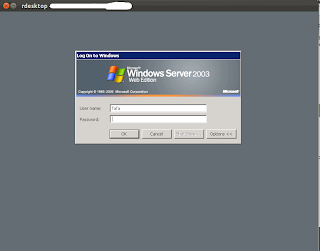

And "Le jeu se poursuit :-) .........." !!!!!
------------------------------------------------------------------------------------
Twitter Angelo Luciani
Linkedin Angelo Luciani ------------------------------------------------------------------------------------
Twitter Angelo Luciani
Linkedin Angelo Luciani ------------------------------------------------------------------------------------ Link to Port-Database

Link to RDesktop
Hi Folks,
The port 3389 captured my attention In the previous article regarding NMAP.
There was located " MS Terminal Server process" .

Remote Desktop Protocol (RDP) is a proprietary protocol developed by Microsoft, which provides a user with a graphical interface to another computer. The protocol is an extension of the ITU-T T.128 application sharing protocol.Clients exist for most versions of Microsoft Windows (including Windows Mobile), Linux, Unix, Mac OS X, Android, and other modern operating systems and default por is 3389.
I have installed on my Linux Ubuntu RsDesktop.
To install on Ubuntu you need to run "apt-get install rdesktop" and I've runned the following syntax:
rdesktop <server>
where '<server>' it's the target server.

And in front of me "Provider" desktop :-) !!!!!


------------------------------------------------------------------------------------
Twitter Angelo Luciani
Linkedin Angelo Luciani ------------------------------------------------------------------------------------
domenica 5 febbraio 2012
Just Come Back From Asia !! All about Penguins
------------------------------------------------------------------------------------
Twitter Angelo Luciani
Linkedin Angelo Luciani ------------------------------------------------------------------------------------ Hi guys,
I didn't update because I was in vacation !!!
I was in MANILA, PHILIPPINES !!!
And in this hot Country I have seen :penguins ^-^ !!!!
hahahahaha !!! Superfunny Linux mascotte !!!

 ------------------------------------------------------------------------------------
Twitter Angelo Luciani
Linkedin Angelo Luciani ------------------------------------------------------------------------------------
Twitter Angelo Luciani
Linkedin Angelo Luciani ------------------------------------------------------------------------------------ Hi guys,
I didn't update because I was in vacation !!!
I was in MANILA, PHILIPPINES !!!
And in this hot Country I have seen :penguins ^-^ !!!!
hahahahaha !!! Superfunny Linux mascotte !!!


Twitter Angelo Luciani
Linkedin Angelo Luciani ------------------------------------------------------------------------------------
mercoledì 7 dicembre 2011
DNS Information Gatering (Nslookup) , Port scanner (NMap)
------------------------------------------------------------------------------------
Twitter Angelo Luciani
Linkedin Angelo Luciani ------------------------------------------------------------------------------------ Hi Everyone,
Thank you Germany !!
Nmap (Network Mapper) is a security scanner originally written by Gordon Lyon
(also known by his pseudonym Fyodor Vaskovich) used to discover hosts and services
on a computer network, thus creating a "map" of the network.
Nmap has been able to extend its discovery capabilities beyond simply figuring out whether a host is up or down and which ports are open and closed;
it can determine the operating system of the target, names and versions of the listening services, estimated uptime, type of device, and presence of a firewall.
Do you remember Trinity & Nmap in Matrix film???
Below the steps.

By "WHOIS" command I get DNS severs.

2. Run "HOST" command with the scope to get ip address regarding DNS.

3. Use "NSLOOKUP" .
By "NSLOOKUP" it's possible to send query to DNS server and obtain more information regarding the TARGET.
Write on the shell :
nslookup
> server X.X.X.X
set type = any

 I have completed the action running NMAP on the Target.
nmap "ip address target server"
Below the image with the port list.

------------------------------------------------------------------------------------
Twitter Angelo Luciani
Linkedin Angelo Luciani ------------------------------------------------------------------------------------
Twitter Angelo Luciani
Linkedin Angelo Luciani ------------------------------------------------------------------------------------ Hi Everyone,
Thank you Germany !!
A lot of visitors from there. I love you !!
I tried to execute the first part of Penetration Test.
From the Linux BackTrack5 I used NSLookUP and Nmap.
Nslookup is a network administration command-line tool available for many computer operating systems for querying the Domain Name System (DNS) to obtain domain name or IP address mapping or for any other specific DNS record.
The name nslookup means name server lookup.
Nslookup uses the operating system's local Domain Name System resolver library to perform its queries.
The name nslookup means name server lookup.
Nslookup uses the operating system's local Domain Name System resolver library to perform its queries.
(also known by his pseudonym Fyodor Vaskovich) used to discover hosts and services
on a computer network, thus creating a "map" of the network.
Nmap has been able to extend its discovery capabilities beyond simply figuring out whether a host is up or down and which ports are open and closed;
it can determine the operating system of the target, names and versions of the listening services, estimated uptime, type of device, and presence of a firewall.
Do you remember Trinity & Nmap in Matrix film???
Below the steps.
1. Open a shell in Linux BackTrack5, and write:
WHOIS "url target server"

By "WHOIS" command I get DNS severs.

2. Run "HOST" command with the scope to get ip address regarding DNS.

3. Use "NSLOOKUP" .
By "NSLOOKUP" it's possible to send query to DNS server and obtain more information regarding the TARGET.
Write on the shell :
nslookup
> server X.X.X.X
set type = any


By "NsLookUp"it is possible to get a lot of data, one for example the "mail server".
It's possible to connect on the mail server running a telnet on 25 port.

nmap "ip address target server"
Below the image with the port list.

In this list, the port 3389 captured my attention where is present MS Terminal Server process.
I read that it's possible to hack it, in the next post I'll talk about it.
Thanks to everyone,
Angelo Luciani
------------------------------------------------------------------------------------
Twitter Angelo Luciani
Linkedin Angelo Luciani ------------------------------------------------------------------------------------
giovedì 24 novembre 2011
Google Hacking (Information Gathering)
Invite Angelo Luciani on Linkedin
Follow Angelo Luciani on Twitter
Hi everyone,
Google provides "directives" which are easy to use and help us to get more information.
If you click the following link you can download the book
googlehackers Book
created by Johnny Long.
I've found it running on Google: "filetype:pdf jonny Long Google hacking".
I created 3 videos with some examples....
"site: polito.it record" (force to search on "Politecnico di Torino" University site the word "record").
"site:www.cnn.com italy" (force to search "Italy" on CNN site)
allintitle: Italy 2011 (Hack to search the list of sites with all keywords you entered )
inurl: spaghetti (search all sites with at least one keywords you entered )
"site:www.cnn.com italy" (force to search "Italy" on CNN site)
"cache:www.cnn.com italy" (Use google cache, it's good to cover traces )
"cache:www.cnn.com filetype:xls password" (Looking for in the Google Cache xls files called password)
Follow Angelo Luciani on Twitter
Hi everyone,
Google provides "directives" which are easy to use and help us to get more information.
If you click the following link you can download the book
googlehackers Book
created by Johnny Long.
I've found it running on Google: "filetype:pdf jonny Long Google hacking".
I created 3 videos with some examples....
"site: polito.it record" (force to search on "Politecnico di Torino" University site the word "record").
"site:www.cnn.com italy" (force to search "Italy" on CNN site)
allintitle: Italy 2011 (Hack to search the list of sites with all keywords you entered )
inurl: spaghetti (search all sites with at least one keywords you entered )
"site:www.cnn.com italy" (force to search "Italy" on CNN site)
"cache:www.cnn.com italy" (Use google cache, it's good to cover traces )
"cache:www.cnn.com filetype:xls password" (Looking for in the Google Cache xls files called password)
sabato 19 novembre 2011
Information Gathering (WebSite Copier) WebHTTrack VS httrack (created video)
Invite Angelo Luciani on Linkedin
Follow Angelo Luciani on Twitter
Follow Angelo Luciani on Twitter
Phases of a penetration test
A PenTest has got 4 steps:
1. Information Gathering
2. Scanning
3. Explotation
4. Maintaining Access
The first step is the most important,The more time you spend collecting information on your target, the more lately you are to be successfull in later phases.
The first program I used is a "Website Copier", at the moment I am still in the first phase.
From Linux Ubuntu 11.10 I run "Webhttrack".
click on the following link, it is a tutorial step by step.
From Linux BackTrack 5 I run "httrack" from the shell.
It's interesting "httrack" because if you know the commands list, it's possible to create some scripts.
In the following link is the commands guide.
And now the video:
sabato 12 novembre 2011
10 actions whit Penetration Tester Distribution Linux BackTrack (3 videos created)
Invite Angelo Luciani on Linkedin
Follow Angelo Luciani on Twitter
Hi Guys,
I want to talk about "url ref".
My ex-officemate opened "url ref" from:
http://webmail.XXXXXinformatica.com/zimbra/
I have inserted "XXXXX" for privacy.
Thank you guys to follow me :-D !!!!
The second "http://directfashion.tk/" is a "ref Spam".
The scoop of this link is to stole passwords and other codes.
More information on :
http://professormungleton.blogspot.com/p/referral-spam.html
OK WE CAN START !!!
I used BackTrack "revolution" distro from Ubuntu Oneiric.
In the previous post I wrote how to set up the latest VMPLAYER on Oneiric.
Log in as root:
default name: root
default password: toor
You can start GUI runnig the command on the shell:
startx
BackTrack does not come with networking enable so you need to re-start it.
Open the terminal and write:
ifconfig -a
This command show you available interfaces.
The "lo" interface is your loop back interface.
The "eth1" is the first internet card.
To turn on the network card you have to enter in the shell:
ifconfig eth1 up
"ifconfig" is a Linux command that means "I want to configure my network interface" and "up" mean "turn on it".
I have created 3 videos in "youtube" HD format:
1) Power on /start up Backtrack
2) Log in with the default user name and password
3) Start X (GUI)
4) View all network interfaces
5) Turn up the desidered network interface
6) Assign an Ip Address Manually
7) View the manually ip Assigned
8) Using using command line interface too
WHOIS get information to target_domain
HOST translate HOST in IP address
9) Assign an ip address through DHCP
10) View the dynamically assigned address
It's possible to Reboot the machine using command line interface too.
The command are:
Reboot
Poweroff
It is comfortable, in my opinion .
Thanks to everyone.
Angelo Luciani
Invite Angelo Luciani on Linkedin
Follow Angelo Luciani on Twitter
p.s: mahal kita mahal ko !!
Follow Angelo Luciani on Twitter
Hi Guys,
I want to talk about "url ref".
My ex-officemate opened "url ref" from:
http://webmail.XXXXXinformatica.com/zimbra/
I have inserted "XXXXX" for privacy.
Thank you guys to follow me :-D !!!!
The second "http://directfashion.tk/" is a "ref Spam".
The scoop of this link is to stole passwords and other codes.
More information on :
http://professormungleton.blogspot.com/p/referral-spam.html
OK WE CAN START !!!
I used BackTrack "revolution" distro from Ubuntu Oneiric.
In the previous post I wrote how to set up the latest VMPLAYER on Oneiric.
Log in as root:
default name: root
default password: toor
You can start GUI runnig the command on the shell:
startx
BackTrack does not come with networking enable so you need to re-start it.
Open the terminal and write:
ifconfig -a
This command show you available interfaces.
The "lo" interface is your loop back interface.
The "eth1" is the first internet card.
To turn on the network card you have to enter in the shell:
ifconfig eth1 up
"ifconfig" is a Linux command that means "I want to configure my network interface" and "up" mean "turn on it".
I have created 3 videos in "youtube" HD format:
1) Power on /start up Backtrack
2) Log in with the default user name and password
3) Start X (GUI)
4) View all network interfaces
5) Turn up the desidered network interface
6) Assign an Ip Address Manually
7) View the manually ip Assigned
8) Using using command line interface too
WHOIS get information to target_domain
HOST translate HOST in IP address
9) Assign an ip address through DHCP
10) View the dynamically assigned address
It's possible to Reboot the machine using command line interface too.
The command are:
Reboot
Poweroff
It is comfortable, in my opinion .
Thanks to everyone.
Angelo Luciani
Invite Angelo Luciani on Linkedin
Follow Angelo Luciani on Twitter
p.s: mahal kita mahal ko !!
mercoledì 9 novembre 2011
Install the latest VMPlayer on Ubuntu 11.10 «Oneiric Ocelot»
Hi all,
Today I show you how to install the latest "VMplayer" on Ubuntu 11.10 «Oneiric Ocelot»
Ok let's Go!
"VMplayer" is important because we use it to run "Linux BackTrack" (Take a look to previous post).
You can download "VMware-Player-4.0.0-471780.x86_64.bundle" from http://www.wmware.com/ .
Register if you do not already have an account. .... The installation file(s) can be downloaded as many times as you want.
Just do the following:
Go to the terminal -> Go to the location of the file
Type: >chmod +x <file name>
Now you type: >sudo ./<file name>
You should see an graphical VMware installer, just follow the steps. After the installation you'll find the launchers in your "System Tools"
Today I show you how to install the latest "VMplayer" on Ubuntu 11.10 «Oneiric Ocelot»
Ok let's Go!
"VMplayer" is important because we use it to run "Linux BackTrack" (Take a look to previous post).
You can download "VMware-Player-4.0.0-471780.x86_64.bundle" from http://www.wmware.com/ .
Register if you do not already have an account. .... The installation file(s) can be downloaded as many times as you want.
Just do the following:
Go to the terminal -> Go to the location of the file
Type: >chmod +x <file name>
Now you type: >sudo ./<file name>
You should see an graphical VMware installer, just follow the steps. After the installation you'll find the launchers in your "System Tools"
domenica 6 novembre 2011
The Operative System for Penetration testing
Hi all,
I'm back, today I'd like to talk about Penetration Testing.
I read "Penetration Tester's Open Source Toolkit, Third Edition" and I really enjoy it.
I recommend to you if you are interested on Testing.
This book explains the steps to make a good Penetration Test and how to write documentations.
http://www.amazon.com/Penetration-Testers-Source-Toolkit-Third/dp/1597496278/ref=sr_1_sc_1?s=books&ie=UTF8&qid=1320617698&sr=1-1-spell
If you want to perform a Pen Test the right instrument is Linux Back Track.
In the following link, you can get a "ISO".
http://www.backtrack-linux.org/
When I saw the first time BackTrack distribution I thought "It's like Matrix, a lot of Army"
Below a short video when I Run Back Track 5 from Linux Natty 11.04.
See you sooner
Angelo Luciani
I'm back, today I'd like to talk about Penetration Testing.
I read "Penetration Tester's Open Source Toolkit, Third Edition" and I really enjoy it.
I recommend to you if you are interested on Testing.
This book explains the steps to make a good Penetration Test and how to write documentations.
http://www.amazon.com/Penetration-Testers-Source-Toolkit-Third/dp/1597496278/ref=sr_1_sc_1?s=books&ie=UTF8&qid=1320617698&sr=1-1-spell
If you want to perform a Pen Test the right instrument is Linux Back Track.
In the following link, you can get a "ISO".
http://www.backtrack-linux.org/
When I saw the first time BackTrack distribution I thought "It's like Matrix, a lot of Army"
Below a short video when I Run Back Track 5 from Linux Natty 11.04.
See you sooner
Angelo Luciani
Iscriviti a:
Post (Atom)